The Phantom Hour Paradox: How Daylight Saving Time Breaks Databases, Cron, and Engineers' Sanity
🇺🇦 Читати цю статтю українською мовою
Every year on the final Sunday of October, millions of people rejoice: “Hooray, we get an extra hour of sleep!”
At that exact moment, thousands of DevOps engineers, database administrators, and backend developers wake up in a cold sweat. For server infrastructure, financial ledger systems, and distributed databases, the transition to standard winter time (Daylight Saving Time / DST fallback) is not a pleasant bonus hour — it is an annual séance of temporal chaos where physical time performs a reverse backflip.
At 04:00 AM, the system clock abruptly leaps backward to 03:00 AM. The interval between 03:00 and 04:00 occurs twice in a single night.
What does your automated recurring billing script do? Your hourly backups? Your logging pipelines, rate limiters, and monitoring alerts?
Here is an architectural dive into why time in software engineering is one of the most hazardous minefields in computing, what disasters the “phantom hour” triggers, and how to engineer your systems so you never suffer from temporal paradoxes.
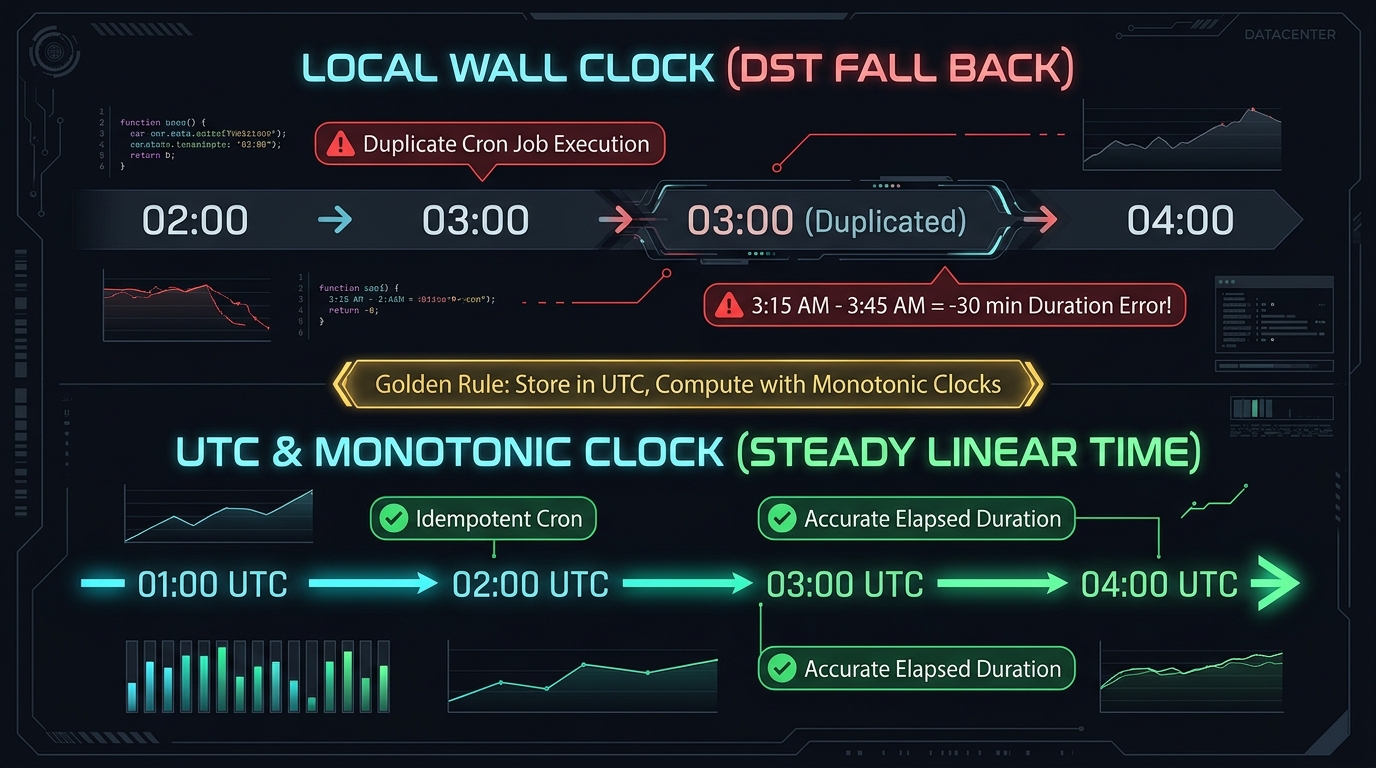 Fig. 1. Anatomy of a temporal paradox: Local Wall Clock with duplicate hours vs. monotonic, continuous UTC timeline
1. Attack of the Clones in Cron: The Double Billing Trap
Let us begin with a textbook disaster that has burned even top-tier tech companies.
Consider a standard job configured in the system scheduler crontab that charges subscriptions or compiles nightly financial statements:
30 3 * * * /usr/bin/python3 /opt/billing/charge_subscriptions.py
If your host machine is configured to a local regional timezone (such as Europe/Kyiv, Europe/Berlin, or America/New_York):
- 03:30 (Daylight Saving Time): Cron triggers and successfully processes payments for the day.
- 04:00: The operating system shifts the clock back one hour to 03:00.
- 03:30 (Standard Winter Time): Cron checks the clock, observes
03:30, and triggers the billing script a second time!
Customers wake up to duplicate bank charges, accounting enters emergency triage, and customer support desks are overwhelmed by automated ticket storms.
What Happens in the Spring (Spring Forward)?
In March, the clock jumps forward from 02:59:59 directly to 04:00:00. The hour between 03:00 and 04:00 never occurs at all. Any script scheduled inside that skipped window fails to run even once: database vacuums are skipped, caches are unprimed, and automated reports never generate.
2. Temporal Paradoxes in Databases: TIMESTAMP WITHOUT TIME ZONE
Ask any senior database architect about their biggest pet peeve, and TIMESTAMP WITHOUT TIME ZONE will inevitably top the list.
Consider an e-commerce orders table:
1
2
3
4
5
CREATE TABLE orders (
    id SERIAL PRIMARY KEY,
    created_at TIMESTAMP WITHOUT TIME ZONE DEFAULT NOW(),
    amount DECIMAL(10, 2)
);
During the night of the DST fallback:
- Customer A places an order at 03:45 AM (Summer Time / UTC+3).
- Twenty minutes later, the clock jumps back one hour.
- Customer B places an order at 03:05 AM (Winter Time / UTC+2).
Your database stores the following records:
- Order #1:
2026-10-25 03:45:00 - Order #2:
2026-10-25 03:05:00
Run a routine sorting query:
1
SELECT * FROM orders ORDER BY created_at ASC;
The database returns Order #2 before Order #1, even though Order #2 occurred twenty minutes later in real time! If your business logic relies on timestamps to assign limited stock, enforce first-come-first-served queues, or audit transaction sequences, your data integrity collapses.
3. Negative Duration: “Task Finished in -30 Minutes”
A common rookie mistake is relying on the local “Wall Clock” to measure elapsed execution time:
1
2
3
4
5
6
7
8
9
10
11
12
13
import datetime
import time

start_time = datetime.datetime.now() # E.g., 03:50:00

# Executing a heavy 20-minute data ingestion job...
# During execution, the server clock rolls back 1 hour!

end_time = datetime.datetime.now()   # Becomes: 03:10:00

duration = end_time - start_time
print(f"Elapsed duration: {duration}")
# Outputs: -1 day, 23:20:00 (i.e., -40 minutes!)
The Production Blast Radius of Negative Time:
- Rate Limiters: Token Bucket and Leaky Bucket algorithms calculate available quota by multiplying the token refill rate by
delta_time. Dividing or multiplying by a negative integer causes immediate application panics or permanently unthrottles request streams, opening vulnerabilities to DDoS attacks. - SLA & Health Monitoring: Metrics collectors (Prometheus / Datadog) record negative latencies (e.g.,
-30,000ms), causing alert thresholds to misfire and paging on-call engineers.
The Architectural Cure: Monotonic Clocks
To calculate elapsed duration, never consume calendar wall-clock time. Always invoke a monotonic clock, which tracks CPU ticks since machine boot and is physically guaranteed never to step backward:
1
2
3
4
5
import time

start = time.monotonic()  # CPU tick counter
# ... heavy operation ...
elapsed = time.monotonic() - start # Always guaranteed positive and exact!
4. Real-World Historical Time Disasters
Think these edge cases are merely academic? History proves otherwise:
- Medical Infusion Pumps (2012): A high-profile hospital investigation revealed automated drug delivery systems in intensive care units locked out pain medication administration because a clock fallback led the device firmware to believe a prior dose had been administered “in the future.”
- Airline Scheduling Glitches: Multiple regional carriers experienced software crashes when short 50-minute flights recorded negative durations (
-10 minutes). Departing at 03:30 local and landing at 03:20 local tripped flight dispatch validators. - Microsoft Azure Cloud Outage (2012): Global Azure clusters suffered a massive leap-year calculation bug tied to timezone handling in hypervisor agent layers, leaving virtual machines unable to provision for over 24 hours.
5. The IANA Time Zone Database: One Volunteer Holding Up the Internet
How does your server or phone even know when a given country transitions between winter and summer time?
The entire world relies on the open-source IANA Time Zone Database (tzdb), created by Arthur David Olson in the 1980s and maintained for decades almost single-handedly by computer scientist Paul Eggert.
It is a massive plaintext historical repository documenting every geopolitical clock change:
1
2
3
4
Zone Europe/Kyiv  2:02:04 - LMT 1880
                  2:00 Russia EEST 1991 Sep 29 2:00s
                  2:00 C-Eur  EE%sT 1996 May 13
                  2:00 EU     EE%sT
The bane of timekeeping engineers is politicians. Parliaments frequently pass laws abolishing or altering DST transitions just days before the scheduled switch.
- If updated
tzdatapackages are not distributed and compiled across millions of devices in time, chaos ensues: half your infrastructure operates under old rules while clients follow new ones.
The Engineer’s Survival Checklist: Best Practices
To ensure your systems sleep soundly regardless of the season, follow these 4 golden rules:
1. Servers Must Run EXCLUSIVELY in UTC
Production servers should never run in local timezones. No exceptions. Verify your host configuration right now:
1
timedatectl
If your timezone is set to anything other than UTC, fix it immediately:
1
sudo timedatectl set-timezone UTC
In UTC (Coordinated Universal Time), Daylight Saving Time does not exist. There are always 60 clean, monotonic minutes in every hour, 24 hours a day, 365 days a year.
2. Databases: Use TIMESTAMPTZ or Unix Epochs
- In PostgreSQL, always specify
TIMESTAMPTZ(Timestamp with time zone). PostgreSQL stores values converted to UTC internally and formats them to the requesting client connection. - Alternatively, store raw Unix Epoch timestamps (the number of seconds or milliseconds elapsed since January 1, 1970 UTC) — an absolute scalar integer immune to DST.
3. Schedulers: Bind to UTC or Fixed Intervals
- Bind critical recurring cron jobs to UTC timestamps (e.g.,
01:00 UTC). - Better yet, adopt Systemd Timers utilizing fixed elapsed intervals rather than calendar wall-clock triggers:
1
2
3
[Timer]
OnUnitActiveSec=24h
AccuracySec=1m
4. Local Time Formatting Belongs on the Frontend
Conversion to the user’s regional timezone should occur at the presentation layer: in the web browser or mobile client. In modern JavaScript, this requires a single native line:
1
const userLocalTime = new Date(utcTimestamp).toLocaleString();
Conclusion
The Daylight Saving Time transition is an infallible litmus test for engineering maturity. If your architecture survived the last Sunday of October without duplicate invoices, missing backups, or corrupted database ordering — congratulations, your stack is built like a fortress!
And if your production hosts are still running on local system time — go set them to UTC over your Sunday coffee. ☕🕰️