Zombies, Vampires, and Ghosts in Linux: How to Purge Digital Undead from Your Servers this Halloween
🇺🇦 Читати цю статтю українською мовою
October 31st, All Hallows’ Eve. Everyday folks put on witch hats, carve glowing Jack-o’-lanterns, and binge horror movies.
Systems administrators and DevOps engineers, however, have no need for Hollywood spooks — they live among real computational monsters every day. Deep inside the Linux kernel wander dead zombie processes, unmanaged Docker containers suffer silent undead uprisings, and corporate cloud accounts are haunted by ghost servers draining infrastructure budgets with the thirst of insatiable vampires.
Today, in the festive spirit of Halloween, let’s explore the anatomy of server-side ghouls: why the legendary kill -9 incantation is completely powerless against zombies, why Docker containers desperately need a “grim reaper,” and how a handful of terminal spells can perform a complete production exorcism.
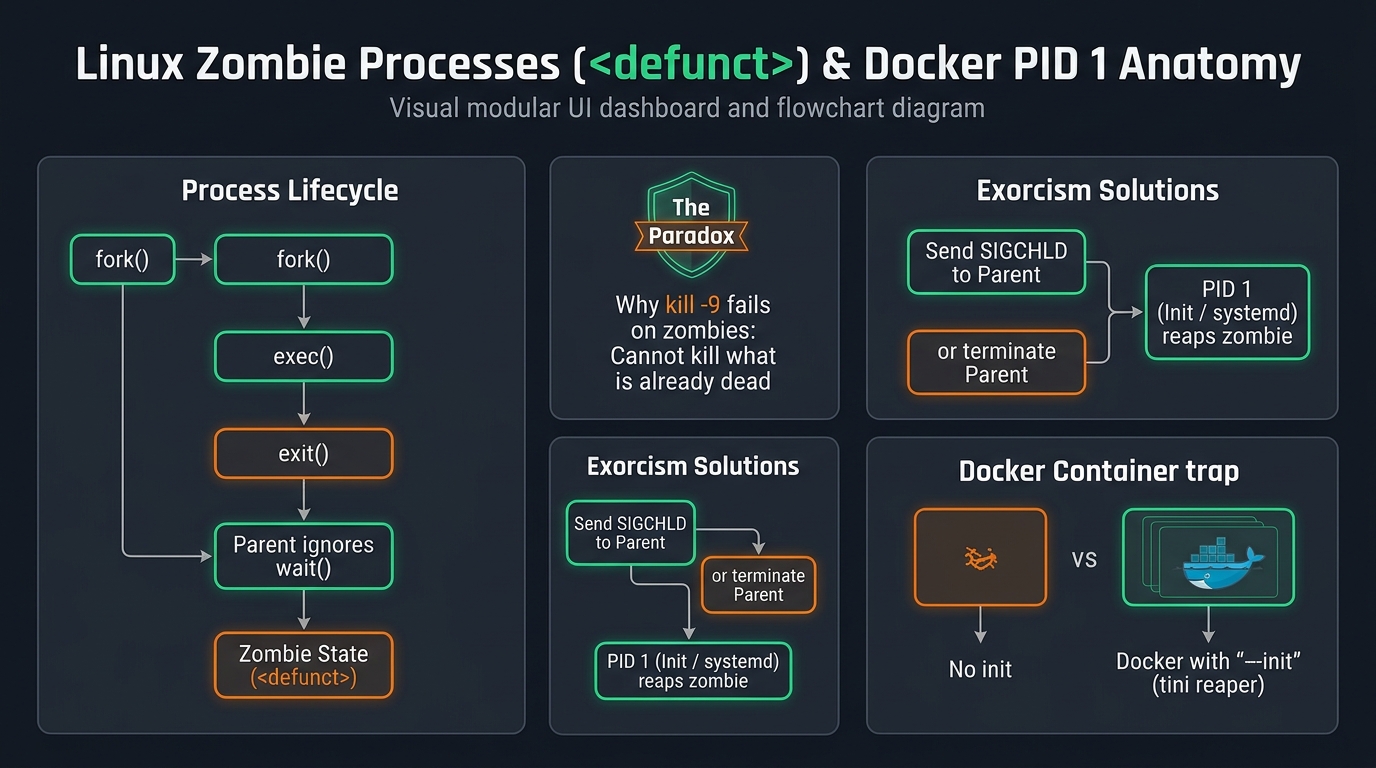 Fig. 1. The lifecycle of a zombie process: why kill -9 fails and how containers without init hoard digital corpses
1. What Are Zombie Processes (<defunct>) and How Are They Born?
Open your terminal, run ps aux | grep Z or launch top, and behold the horror:
1
2
3
USER       PID %CPU %MEM    VSZ   RSS TTY      STAT START   TIME COMMAND
app       4412  0.0  0.0      0     0 ?        Z    10:15   0:00 [python3] <defunct>
app       4413  0.0  0.0      0     0 ?        Z    10:16   0:00 [node] <defunct>
A status flag of Z (or the tag <defunct>) means you are staring directly into the lifeless eyes of a genuine Zombie Process.
How Does a Living Process Turn Undead?
When a Unix process spawns a child task via the fork() system call:
- The child process finishes its workload and invokes
exit(0). - The Linux kernel instantly deallocates all of its physical memory, cleans its file descriptors, and closes open network sockets. For all practical purposes, the child is dead.
- HOWEVER! The kernel must retain a minimal death certificate in the system’s Process Table: its
PID, termination status, and exit code. - This record remains in limbo waiting for the Parent Process to execute the
wait()orwaitpid()system call to collect the death certificate and release the entry.
If the author of the parent application wrote buggy code, neglected to call wait(), or froze in a deadlocked thread — the child process becomes trapped between the mortal world and the digital afterlife. It consumes zero RAM and 0% CPU, yet refuses to vanish from the kernel’s table.
2. The Great Paradox: Why kill -9 Cannot Slay a Zombie
The visceral reaction of any frustrated engineer is immediate:
1
sudo kill -9 4412
You slam Enter, check ps aux again… and the zombie stares right back at you, completely unfazed! You run kill -9 ten times in a row — nothing happens.
Why?
[!CAUTION] The Golden Rule of System Exorcism:
“You cannot kill what is already dead!”
TheSIGKILLsignal (kill -9) is dispatched to living processes instructing them to abort immediately and relinquish resources. But a zombie process is already deceased. It contains no running executable code in memory to intercept, interpret, or execute the signal.
If Zombies Consume No Memory, Why Are They Dangerous?
Zombies consume the single most precious resource in Unix: Process IDs (PIDs). By default, the Linux PID ceiling is typically 32,768 or 65,536 (check yours via cat /proc/sys/kernel/pid_max). If a rogue parent leaks thousands of zombies, your operating system will completely run out of available PIDs.
The consequence: the kernel abruptly refuses to spawn any new processes, erroring out with:
bash: fork: retry: Resource temporarily unavailable. You won’t even be able to establish an SSH connection because the daemon cannot fork an authentication child session!
3. The True Exorcism: Putting Zombies to Rest
To banish a zombie, you must force its parent to perform its post-mortem duty.
Step 1: Identify the Negligent Parent (PPID)
Inspect the process lineage using ps:
1
ps -o pid,ppid,stat,cmd -p 4412
This yields:
1
2
  PID  PPID STAT CMD
 4412  3890 Z    [python3] <defunct>
The negligent parent is PPID = 3890.
Step 2: Nudge the Parent with SIGCHLD
Send a gentle reminder to the parent process using the SIGCHLD signal:
1
sudo kill -s SIGCHLD 3890
If the parent is functional and merely lazy, it intercepts the signal, executes wait(), and the zombie instantly vanishes into the ether.
Step 3: The Nuclear Option: Slaying the Parent
If the parent process is completely unresponsive or deadlocked, terminate the parent itself:
1
sudo kill -9 3890
What occurs under the hood?
- The negligent parent dies.
- The zombie child becomes an Orphan.
- Under the immutable laws of Linux, all orphans are immediately adopted by the ancestor of all processes:
initorsystemd(PID 1). - And
systemdis the ultimate Zombie Reaper. The moment it adopts an orphaned zombie, it immediately callswait()and cleans the process table forever!
4. The Docker Zombie Apocalypse: The PID 1 Trap
While standard Linux hosts have systemd perpetually reaping orphans in the background, Docker containers can be a horror film.
Consider a standard Dockerfile:
1
CMD ["node", "server.js"]
Your node process becomes PID 1 inside the isolated container namespace!
However, general runtime environments (Node.js, Python, Ruby, Java) were never designed to act as init systems. They do not automatically reap grandchildren or collect zombie orphans.
If your application routinely spawns background utilities (e.g., resizing media via imagemagick, issuing curl health checks, or invoking child_process.spawn), an unmanaged container can silently hoard hundreds of zombies over a few days until the containerized process table exhausts itself.
The Cure: Two Simple Fixes
Option 1: The --init Flag (The Easiest Fix):
1
docker run -d --init -p 8080:8080 my-app:latest
The --init flag instructs the Docker daemon to insert a microscopic C init binary called tini as PID 1. It consumes negligible memory, forwards signals cleanly, and faithfully reaps any orphaned zombie children!
Option 2: Bake tini into Your Image:
1
2
3
4
5
6
# For Debian / Ubuntu bases:
RUN apt-get update && apt-get install -y tini

# Set tini as entrypoint:
ENTRYPOINT ["/usr/bin/tini", "--"]
CMD ["node", "server.js"]
5. Ghost Servers and Vampires: The Shadow IT Curse
Beyond kernel zombies, every infrastructure team battles architectural specters:
- Ghost Instances: That temporary VM an intern spun up on AWS or Hetzner eighteen months ago for a quick hackathon demo. The intern graduated, the demo ended, but the VM still hums in the cloud, quietly burning company money.
- Vampire Storage (Unattached Volumes): You deleted a deprecated virtual instance, but forgot to check Delete on Termination on its 500GB NVMe volume. It floats in limbo, disconnected from any compute, silently siphoning cloud credits every billing cycle.
- Zombie Packages: Obsolete third-party npm or PyPI libraries abandoned by their maintainers in 2018. They lurk inside your production lockfiles, riddled with CVE vulnerabilities, waiting for malicious actors to exploit them.
The Halloween Sysadmin Toolkit: Terminal Invocations
Keep these handy incantations in your terminal scratchpad:
1
2
3
4
5
6
7
8
9
10
11
# 1. Count the number of zombies lurking on your machine right now
ps aux | awk '{print $8}' | grep -c Z

# 2. Reveal the full graveyard of zombies along with their parent PIDs
ps -A -ostat,ppid,pid,cmd | grep -e '^[Zz]'

# 3. Terminate all negligent parent processes of active zombies (USE WITH CARE!)
kill -9 $(ps -A -ostat,ppid | awk '/[zZ]/ { print $2 }')

# 4. Check what percentage of your system's PID table is currently occupied
echo "PIDs in use: $(ls -d /proc/[0-9]* | wc -l) out of $(cat /proc/sys/kernel/pid_max)"
Conclusion
Linux is a fascinating operating system where dark and spooky terms (Daemons, Zombies, Orphans, Killing) actually describe an elegant, bulletproof Unix design.
Do not fear the undead — just remember to invoke wait(), pass --init to your container runtimes, and audit your cloud infrastructure regularly.
Happy Halloween, may your process tables stay pristine, and may no rogue zombie disturb your sleep tonight! 🎃👻🕯️